

Let’s be honest. Opening your credit report can feel like looking at a test you didn’t study for. It’s a wall of codes, dates, and financial jargon that seems designed to be confusing. But here’s the truth: understanding your credit report is the single most powerful first step you can take to reclaim control of your financial life.
Many people avoid looking at their reports because they’re afraid of what they’ll find. If that’s you, know that you are not alone. We’re going to walk through this together, judgment-free, so you can turn that confusing document into a roadmap for a better financial future.
This guide is built specifically for you, the
Credit Rebuilder. Maybe you’ve hit a few bumps in the road—unexpected medical bills, a job loss, or just a few decisions that didn’t pan out. Now, you’re ready to clean things up and watch your score climb from the 500s or low 600s toward that 670+ goal, opening up doors to better car loans and credit cards. Reading your report is where it all begins.
Quick Answer: The Bottom Line
Don’t have time to read the whole thing? Here’s the TL;DR:
- What It Is: Your credit report is a detailed record of your borrowing history. Think of it as your financial resume that lenders look at to decide whether to loan you money.
- Where to Get It Free: You are entitled to a free copy of your reports from the three major credit bureaus (Experian, Equifax, and TransUnion) every single week at AnnualCreditReport.com. This is the only officially authorized site for free reports.
- What to Look For: Check four main sections: 1) Personal Information (your name, address), 2) Credit Accounts (loans, cards), 3) Public Records (bankruptcies), and 4) Inquiries (who’s been peeking at your credit).
- Most Important Action: Your first job is to hunt for errors. An old address, an account that isn’t yours, or an incorrectly reported late payment could be hurting your score. Finding and fixing mistakes is the quickest win in credit rebuilding.
Cracking the Code: A Step-by-Step Guide to Your Credit Report
Let’s take a deep breath and dive in. This isn’t about reliving past mistakes; it’s about finding future opportunities.
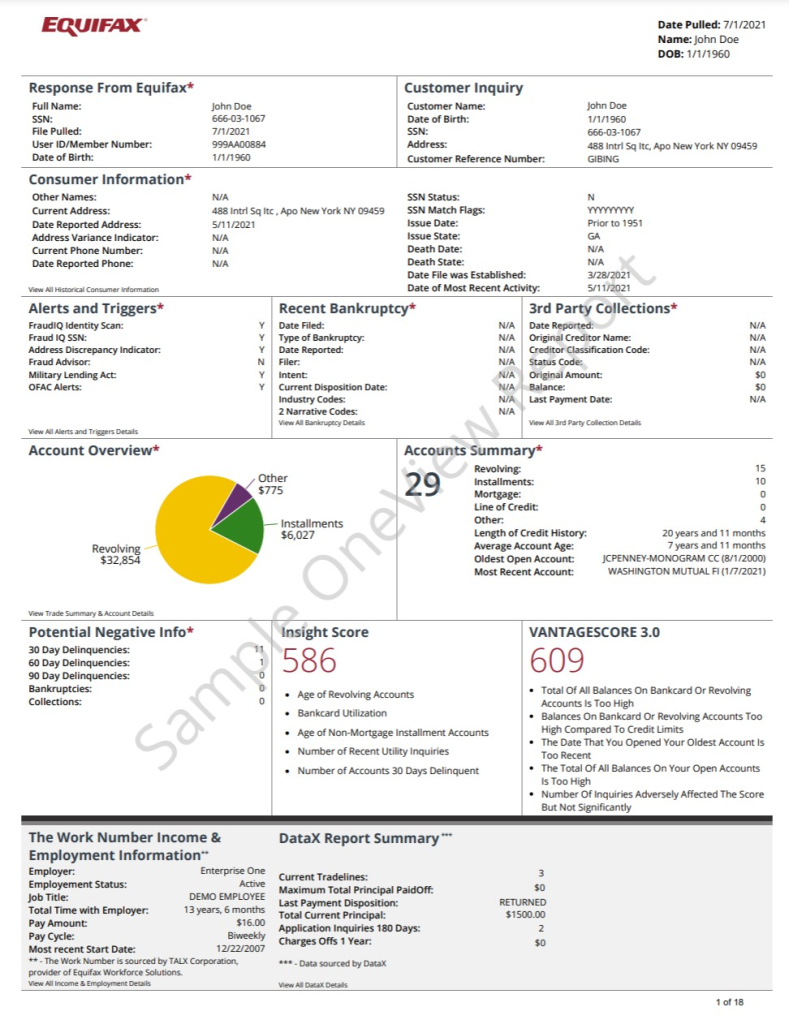
Step 1: Get Your Three Credit Reports
Before you can read it, you have to get it. Head over to AnnualCreditReport.com.
Why all three? Because there are three major credit bureaus in the U.S.: Experian, Equifax, and TransUnion. Lenders aren’t required to report your information to all of them. Your credit card company might report to Experian and TransUnion, but your car loan might only report to Equifax. Therefore, your Equifax credit report might look slightly different from your Experian one. To get the full picture and catch every possible error, you need to check all three.
Remember: Checking your own credit through this site is a “soft inquiry” and does not hurt your credit score. Do it as often as you need to stay informed.
Step 2: Dissect Each Section Like a Detective
As you open each report, you’ll see they’re broken into sections. The formatting might vary slightly between bureaus, but the information is largely the same.
Section 1: Personal Identifying Information
This is the basic “about you” stuff. What you’ll find:
- Your full name (and any variations or aliases)
- Date of birth
- Social Security number (usually partial)
- Current and previous addresses
- Current and previous phone numbers
- Current and previous employers
What to look for: Pay close attention here. This is a prime spot for identity thieves to strike. Check for misspellings of your name, addresses you’ve never lived at, or names you don’t recognize. If anything looks off, it could be a sign of fraud or a simple clerical error that needs to be fixed.
Section 2: Credit Accounts (The Meat and Potatoes)
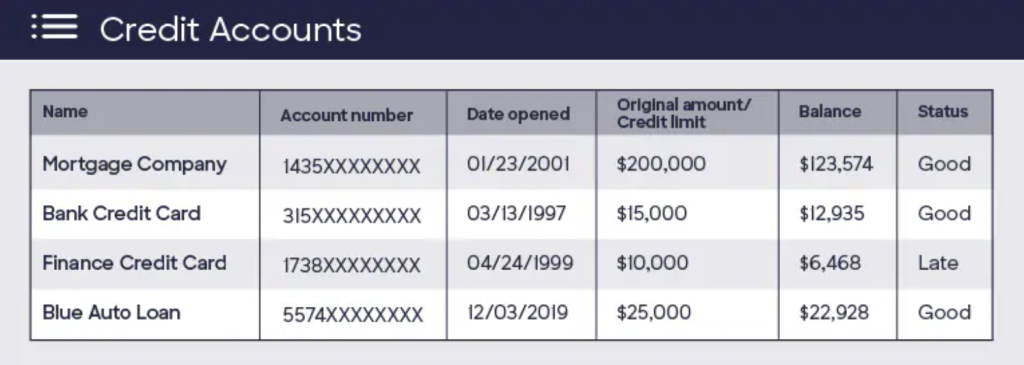
This is the heart of your report. It lists all of your credit accounts, past and present. For each account, you’ll see a ton of detail. Let’s break it down:
- Creditor Name & Account Number: Who loaned you the money (e.g., Capital One, Wells Fargo) and the account number (partial for security).
- Type of Account: Usually falls into two categories:
- Revolving: Accounts where you can carry a balance, like credit cards.
- Installment: Loans with fixed payments for a set period, like a car loan or mortgage.
- Date Opened: When you first opened the account. Older accounts are generally better for your score.
- Credit Limit or Loan Amount: The most you can charge (for cards) or the original loan amount.
- Current Balance: How much you owe on the account as of the reporting date.
- Payment History: This is one of the most important parts. It’s often displayed as a grid showing the last 24 months or more. You’ll see marks like “OK,” “30,” “60,” or “90,” indicating if the payment was on time or 30, 60, or 90 days late.
- Account Status: Tells you if the account is “Open,” “Closed,” or something more negative like “Charged Off” or “Sent to Collections.”
The Credit Rebuilder’s Focus: Spend most of your time here. You’re looking for two main things: errors and opportunities.
- Errors: Is that account even yours? Is the balance correct? Were you really late in March 2022 like it says? A single incorrect late payment mark can drag your score down.
- Opportunities: Look at your “credit utilization ratio”—the relationship between your card’s balance and its credit limit. If you have a card with an $850 balance and a $1,000 limit, your utilization is 85%, which is very high and hurts your score. Identifying which cards have the highest utilization can help you create a plan to pay them down first.
Section 3: Public Records
This section is for financial information that is part of the public record. This can include:
- Bankruptcies
- Foreclosures
- Tax Liens
Luckily, most civil judgments and tax liens no longer appear on credit reports, but bankruptcies still do and can remain for 7-10 years depending on the type. Check that any information here is accurate and up-to-date.
Section 4: Credit Inquiries (Hard vs. Soft)
This section lists everyone who has accessed your credit report. There are two kinds:
- Hard Inquiries: These happen when you apply for new credit—a credit card, a loan, a mortgage. A lender checks your credit to make a lending decision. Too many hard inquiries in a short time can slightly lower your score, as it can look like you’re desperate for credit. They typically stay on your report for two years but only impact your score for the first year.
- Soft Inquiries: These happen when you check your own credit, when a lender sends you a “pre-approved” offer, or when a potential employer checks your history (with your permission). These inquiries do not affect your credit score.
What to look for: Scan the list of hard inquiries. Do you recognize every company? If you see an inquiry from a company you never applied to, it could be a sign of identity fraud.
Why Are My Three Reports Different?
It’s common and completely normal for your Experian, Equifax, and TransUnion reports to not be identical. Here’s a simple table explaining why:
| Credit Bureau | What They Do | Why They Differ | Your Job |
| Experian | Collects and maintains your credit history. | Not all lenders report to all three bureaus. A creditor might only report to Experian. | Check this report for unique errors that don’t appear on the others. |
| Equifax | Collects and maintains your credit history. | An error, like a misreported payment, might show up here but not on the others. | Compare it against the others to spot inconsistencies in balances or account statuses. |
| TransUnion | Collects and maintains your credit history. | The timing of updates can also vary. One bureau might get information faster than another. | Check all three to get a complete and accurate picture of your financial health. |
Exportar para as Planilhas
The bottom line is simple: because the reports can differ, you must review all three to ensure all the information out there about you in the credit world is correct.
Practical Tips & Common Pitfalls for Credit Rebuilders
Okay, you’ve got your reports. Now what?
Practical Tips:
- Look for the Low-Hanging Fruit: Scan your reports for the easiest wins. This is an error that is clearly wrong and simple to fix. A collection account you already paid off that still shows a balance? A typo in your name? Start there.
- Learn the Lingo: Don’t be intimidated by terms like “charge-off.” It simply means the original creditor gave up on collecting the debt and “charged it off” as a loss on their books. They likely sold the debt to a collection agency, which is why you might see the same debt listed twice (once from the original creditor, once from the collection agency). Understanding what these terms mean takes their power away.
- Start a Paper Trail: If you find an error, the next step is to dispute it. While this guide isn’t about the dispute process, the first step is to document everything. Write down the bureau name, the account number, and exactly what the error is. You will dispute the error directly with the credit bureau (they have online portals for this), not the lender.
Common Pitfalls to Avoid:
- The Ostrich Effect (Ignoring Your Reports): The number one mistake is not looking. What you don’t know can and will hurt you in the world of credit. The anxiety is real, but ignorance is more expensive.
- Only Checking One Report: As we’ve seen, the reports can differ. Relying on just one is like looking at only one-third of your financial health.
- Getting Paralyzed by Overwhelm: It’s easy to look at a few collection accounts, high credit card utilization, and late payments and just want to give up. Don’t. Remember, you don’t have to fix everything overnight. Your only goal today was to read and understand. That, in itself, is a huge win.
Money Fox may earn a commission from partners featured on our site, but our reviews and guidance are always based on objective research and honesty.
A Rebuilder’s Story: Meet David

Let me tell you about David, a 38-year-old delivery driver in our community. A few years ago, a tough divorce left him with thousands in credit card debt. His payments fell behind, his credit utilization shot up, and his credit score tanked to 540. He needed a more reliable car but knew that with that score, any loan he got would come with a sky-high interest rate.
For almost two years, he ignored the letters from collectors and avoided looking at his credit. Finally, after reading an article like this one, he took a deep breath and went to AnnualCreditReport.com.
“It was like ripping off a band-aid,” he told us. “It was ugly, but for the first time, I knew exactly what I was up against.”
He found an error right away: a collection account from an old cable bill he had paid off over a year ago was still listed with a balance due. He disputed it online with all three bureaus. Within 45 days, the error was corrected on all of his reports. That one small fix boosted his score by nearly 20 points. It didn’t solve everything, but it gave him the hope and momentum he needed to start making a plan for the rest. His journey began not with a big payment, but with the courage to look.
Frequently Asked Questions (FAQ)
1. How often can I check my credit report for free? Thanks to a permanent change made during the pandemic, you can now check your credit reports from all three bureaus for free once a week at AnnualCreditReport.com.
2. Will checking my own report hurt my credit score? No. Checking your own credit reports is a soft inquiry and has no impact on your credit score.
3. What’s the difference between a credit report and a credit score? Your credit report is the detailed file of your credit history (accounts, payments, etc.). Your credit score (like FICO or VantageScore) is a three-digit number, like a grade, that summarizes the information in your report. The report is the history; the score is the grade.
4. How long do negative items stay on my report? Generally: late payments and collections remain for 7 years. Chapter 7 bankruptcies stay for 10 years, and Chapter 13 bankruptcies for 7 years. Hard inquiries stay for 2 years.
5. What should I do if I find an error on my report? You should dispute the error directly with the credit bureau that is reporting the information. Each bureau (Experian, Equifax, TransUnion) has an online dispute process on its website that will walk you through the steps.
6. Does my income appear on my credit report? No. Your credit reports do not contain information about your income, marital status (unless it’s a joint account), or race.
7. Can I add positive information to my report? Yes! Programs like Experian Boost or rent-reporting services allow you to add utility and streaming service payments (which aren’t normally reported) to your credit report to potentially boost your score.
8. What’s a “consumer statement”? If you dispute an item and the credit bureau verifies it as correct, but you still disagree or want to provide context (e.g., “I was late on this payment due to a hospitalization”), you have the right to add a brief, 100-word consumer statement to your file explaining your side of the story.
Leave a Reply